


 by
 | Thank you for Signing Up |


One of the less obvious SEO factors that has gained significant importance at Google is location-based results, which have greatly influenced the way pages are ranked.
GEO-targeted landing pages come with certain GEO elements that can significantly help them rank better in the search results.
This article will introduce you to the world of GEO Location Pages using different methods and elements. The methods in this article are not techniques every SEO expert is aware of, even though they are used by brands worldwide.
Before we delve into it, it is important to understand that the location of the searcher has played an increasingly important role in Google’s results, especially since a local search update in September 2016 that the SEO community nicknamed “Possum” (Google never officially confirmed it). Read more about this in my article on GEO Targeting in SEO.
But what does it take to build a great GEO Landing Page in 2026? Let’s get started.
How to Create a GEO Targeted Landing Page
In many cases, SEO efforts to target local markets are limited to the elements described below.
Building GEO Targeted Landing Pages involves much more. However, we will begin by considering these elements below as they are often put into practice:
- Title Tag
The title tag contains the name of the product or service and the location of the business offering it. Say for instance we intend to create a GEO Landing Page for “Brand Design and Advertisement Services,” the primary way to build this for most SEO professionals would most likely involve creating a GEO Landing Page with the service and its location made conspicuous. For example: “Advertisement Services in San Diego, California”. There’s no harm in this practice, and it can provide noticeable results. - H1 (Header 1)
The first header is usually made similar to the Title Tag in many SEO practices. In the case of the example cited above, the H1 tag could be “Best San Diego Advertisement Services.” - H2 (Header 2)
The second header allows for the use of more keywords. But quite often, most SEOs do not utilize their H2s. A fitting example for the mock service above would be: “Looking for a great Advertisement Company in San Diego?” - Content (particular to the Location)
The biggest mistake most SEOs make here is that they generalize their content. For a GEO-targeted Landing Page, the content on such a page must reflect and provide adequate information about the location.
In our example, the content will become very applicable if it talks about other important features of the location ranging from the weather to the economy, population, important dates, beautiful spots for sightseeing, etc.
Further streamlining of the content will include facts about the advertisement industry in that location (e.g. San Diego).
Templated content that changes automatically for each location can help you scale when creating a large number of GEO landing pages. This is often called the Smart Content Method and involves Smart Content SEO tools. But be careful: Google’s spam policies warn against doorway pages, i.e., near-identical pages created only to rank for different locations. Each page needs enough unique, genuinely useful content for that location.
There Is More to Creating a GEO Targeted Landing Page
The basics of building a GEO targeted Landing Page have been carefully highlighted above. But if you want more than just the basics, you can do much more with GEO landing pages. We are about to delve deep as promised — here are the things you need to know:
- Images (Relevant to the Location)
SEO professionals are often guilty of channeling all their SEO efforts towards other aspects of their SEO campaign, but they often forget the importance of images.
A GEO landing page without a unique image is a common result of this neglect. Local Search Marketing endeavors require unique images on your GEO Landing Page. A unique image in this sense should have no prior presence on the internet. It must be related to the topic and must resonate with the target audience. In my article “How to use SEO Optimized Images” I shed light on this important topic. To suit our example above, we will need to make sure that the image selected will have elements related to, for example “Advertising” and the location “San Diego”. - Display a physical location to represent the service
The location of the business can be essential to running a successful GEO SEO campaign. Local search optimization works better when there is a physical address on your GEO-targeted landing page, ideally matching your Google Business Profile. Google can easily recognize your address in the content of your landing page. - Google Map
With your address already on your landing page, many people will tell you that it is important to embed a Google Map. A map can be helpful for visitors, but in our experience, it doesn’t improve your rankings, and on hundreds of location pages, it mainly adds cost and loading time.
Read more about this issue in my article “Does the Usage of Google Maps Affect Your SEO Rankings?“
Let's Take Things A Notch Higher!
Once you have implemented Step 2, you will have a great Local Landing Page on your hands. But what can we do to make our GEO Landing Page outstanding?
- Fresh Content
I discussed how to “Get More Traffic Using the SEO Fresh Content Technique” in this article. It’s worth a look before reading on.
To achieve this, the content on your page should provide variables that can be easily modified. With this, you wouldn’t need to completely update the entire content on your page as changes to these variables keep your content fresh.
In case you are wondering why you need smart content and shouldn’t do it manually, then think in terms of having to update hundreds and perhaps thousands of Landing Pages that you will create with time. Creating fresh content for each of the hundreds of pages regularly is a daunting task, hence you need content with easily modifiable variables. These variables are also called data points in SEO. - The More Landing Pages, the Better
Creating a GEO landing page for a city is good, but not always good enough, because a city is made up of several smaller areas. Where you actually serve customers, you can target these areas (neighborhoods, nearby towns, counties, etc.) as well. That’s why you need to create more Landing Pages to target each of these places if you want very good results for the bigger target you have in mind. For San Diego, our example, you could create additional landing pages for La Mesa, Chula Vista, La Jolla, Pacific Beach, Point Loma and others. You could also build landing pages for nearby cities such as Carlsbad, Oceanside, Poway, Encinitas, Escondido, etc. Just make sure each page offers real value for that area, rather than only swapping the city name. - Linking Up the Created GEO Targeted Locations
To finally complete this step, you will need to bring all of your SEO GEO Targeted Locations together by interlinking them. If for instance you have created a Landing Page for San Diego with the tag “Advertisement Company in San Diego, California,” and you have mentioned Oceanside, then you should include a link to the landing page for Oceanside.
Becoming the Unbeatable Local SEO Grandmaster
Having applied Steps 1-3, your local SEO expertise can now be considered above average. This next step will equip you with all of the SEO juice and would make you a grandmaster of Local GEO Targeting.
Interlinking Method: The Local SEO Vicinity Method
The interlinking method can be a solution provided by a tool. I have found it to be particularly invaluable for several SEO techniques for GEO-targeted Pages.
With this method, a page can list a specified number of locations around the location targeted by the GEO landing page. One of the brilliant features of this method can be its automatic interlinking capability of certain locations.
Many SEO professionals don’t pay much attention to automating GEO-targeted landing pages. However, travel companies mostly utilize GEO Targeted Landing Pages for their SEO. Have a look at this example below:
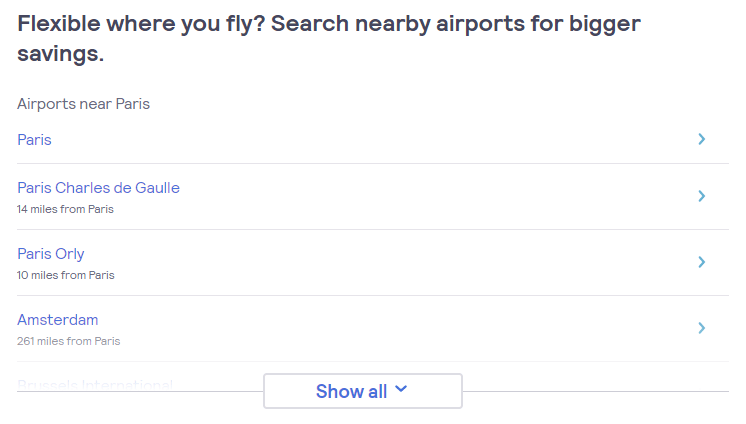
As you can see from the screenshot above taken from www.skyscanner.com on their landing page “Cheap Flights to Paris”, a GEO Location Interlinking Method is used to interlink Landing Pages by displaying the distance to other nearby locations such as “Paris Charles de Gaulle”, “Paris Orly”, and “Amsterdam”.
Let’s have a look on another example:
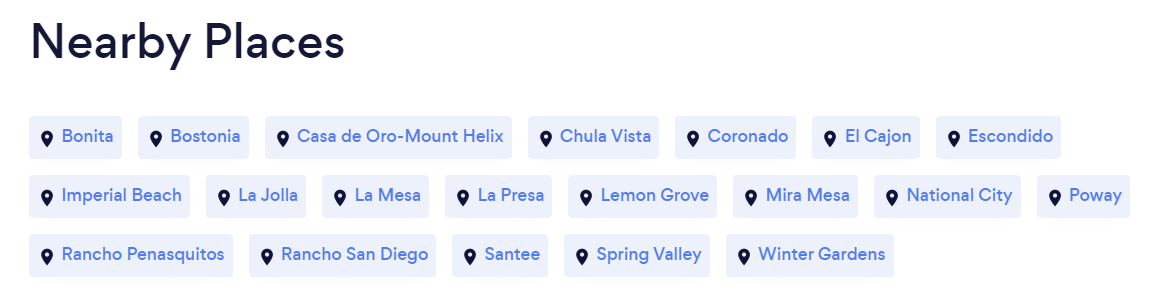
In the example above, from bark.com’s San Diego landing page for dog training (en/us/dog-training/california/san-diego/), another GEO location interlinking method links to other landing pages near “San Diego.”
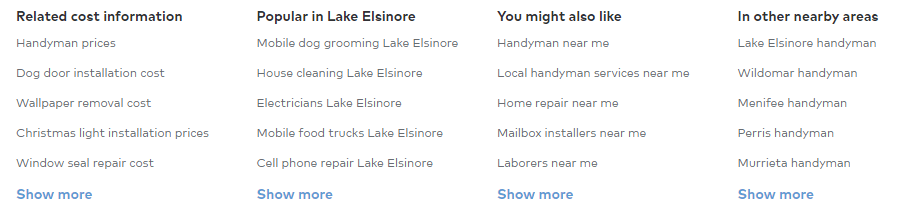
Thumbtack.com also seems to use a GEO location tool that lists nearby locations at the end of its landing pages (the example shows its page under lake-elsinore/handyman/). See below:
Another example below shows another Interlinking Method to create interlinks automatically by calculating the vicinity of other locations. Thus, each and every GEO Landing Page would have their unique interlinking widget — a tool created by us called “Nearby Widget”:
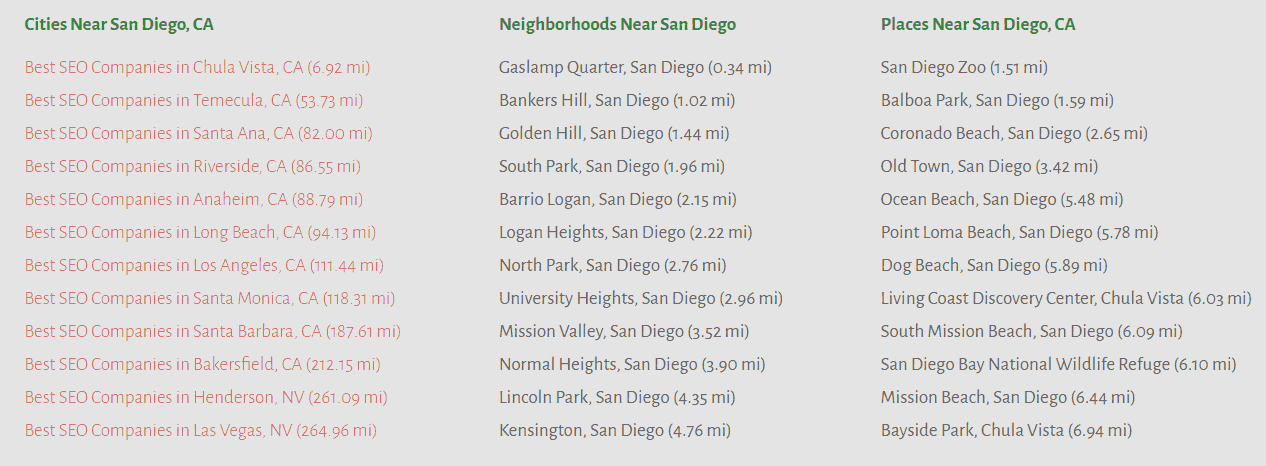
An additional feature is the automatic calculation of nearby cities, towns, and neighborhoods for each GEO landing page, as shown above. This ensures that all landing pages receive regular updates.
SEO Benefits of the Interlinking
Interlinking GEO Landing Pages is an effective way for SEO experts, and its efficiency in the following areas is second to none:
- Interlinking of Locations
With an interlinking method, all targeted locations can be easily crawled and indexed. Google can follow the links and understand how the locations relate to each other. - Unique Pages
Interlinking can arrange pages and locations using different mileage number specifications to make each GEO Landing Page unique. - Location Metrics Analysis
Distance information gives Google additional context about how the locations on your website relate to each other. In our experience, landing pages that are well connected through such a GEO funnel perform better than isolated location pages.
Do I Need This?
The basic value of GEO pages is that they make it easy to offer services and products to audiences in specific areas. This is highly beneficial for every business in today’s competitive business landscape and it does hold the same benefit for businesses and branches that are not even considered brick and mortar.
The Science Behind the Interlinking Method
The interlinking concept mentioned above has been around for a long time.
The general idea of interlinking different pages is that search engines such as Google can crawl pages more easily. For example, when Google crawls a GEO Landing Page “San Diego”, it would then follow the links to “Chicago” and “Miami” since they would be listed on the same page.
This is a concept also known as “Interlinking” or “Crosslinking” that has been around since the foundation of Google. Google’s original link analysis algorithm, PageRank, was named after Google co-founder Larry Page:
Stanford University researchers, including Larry Page and Sergey Brin, described this method as early as 1999 in their paper:
Larry Page’s concept of linking entities to each other was, however, inspired by the “citation index,” whose earliest forms go back to the 12th century:
Below are some good reads about the Citation Index:
The citation index, in turn, builds on the idea of the encyclopedia, which goes back about 2,000 years.
These concepts mentioned above such as “PageRank” in Search Engines, the “Citation Index” in Literature, and “Encyclopedia” all have in common that one source links to another source, and in the end, all sources are connected to each other.
This concept goes back to the Greek “enkyklios paideia,” the “circle of learning,” from which the word “encyclopedia” derives: information that is connected to each other. In SEO, we know it today as “interlinking,” “internal links,” or “link juice”:

Learn How We Can Help You With GEO Location Services with SEO

Article Recommendation:
| Thank you for Signing Up |










Fantastic post! Really enjoyed the way you explained this. Looking forward to more updates like this!